OBD Auto Doctor car scanner
- 4.2
- Rating
- 1.00M
- Installs
- Free
- Price
 Analysis by App-foxy
I approached OBD Auto Doctor as a practical car-diagnostics tool rather than a replacement for a mechanic. It is a free Auto & Vehicles app from Creosys Ltd that works with an ELM327-style OBD2 adapter, giving a phone a way to read information from a compatible vehicle. Its main appeal is simple: instead of guessing why a warning light appeared, I can use the app to inspect the car’s electronic diagnostic information before deciding what to do next.
That makes it useful for ordinary drivers, especially people who want a clearer starting point when the check-engine light comes on. It is also the kind of app that can help someone avoid an unnecessary trip to a workshop for a minor issue, while still reminding them that a code reader cannot physically repair a vehicle or replace professional diagnosis. My overall impression is positive, but the experience depends heavily on the adapter, the car, and the user’s ability to interpret technical information.
How the app feels to read and navigate
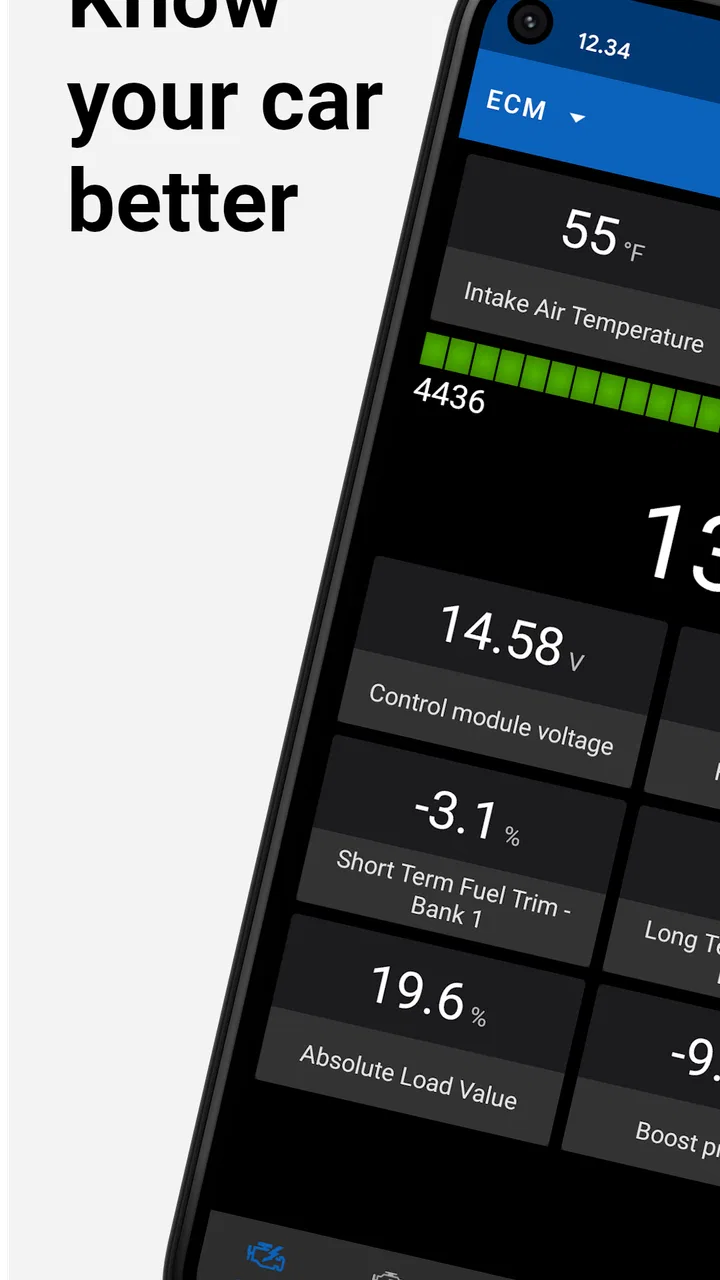
The first thing I noticed is that this is not designed like a casual lifestyle app. The subject is inherently technical, so the interface presents vehicle data, diagnostic codes, and monitoring information rather than friendly step-by-step entertainment. That is appropriate for the job, but it also means that a first-time user may need a little patience before the labels become familiar.
You May Also Like

 Blood Strike: 2.5 Anniversary
Blood Strike’s Loadouts Turn Every Drop Into a Tactical Gamble
A close look at Blood Strike’s custom loadouts: how fast access to signature weapons reshapes its battle royale rhythm, rewards preparation, and narrows the gap between fights.

 Pandora - Music & Podcasts
Pandora’s Music Is Easy to Start, but Harder to Recover
Pandora’s strength is its low-effort path from a seed to a station. Its weak spot is how much confidence it asks you to place in connection, setup, and quiet recovery.

 8 Ball Pool
 Is Built on Rivalries, Rematches, and Routine
A close look at the rivalries, rematches, shared routines, and unanswered safety questions that turn a quick pool match into a persistent mobile community.

 Samsung Music
’s Quiet Strength Is Playing What You Already Own
Its reach comes less from spectacle than from dependable access to a personal library. That simplicity is both the app’s strongest retention engine and its ceiling.

 AccuWeather: Weather Radar
AccuWeather Review: A Quick, Clear Forecast for Everyday Decisions
For everyday plans, the best forecast is the one you can understand quickly. AccuWeather makes rain timing, radar, and local conditions easy to act on, with a few trade-offs.

 Hill Climb Racing
Why Hill Climb Racing Still Turns Crashes Into One More Run
A tiny car, a bumpy hill and one more upgrade: Hill Climb Racing keeps resurfacing because its simple chaos makes every near-miss feel personal.
More From Our News Desk



For someone who reads comfortably on a phone, the basic purpose is easy to understand: connect an adapter, establish communication with the vehicle, and inspect what the car reports. The important distinction is between seeing a code and understanding its meaning. A code can point toward a system or condition, but it does not automatically identify the failed part. I found that keeping this distinction in mind prevents the app from creating false confidence.
The most useful reading habit is to treat every result as a clue, not a verdict. If the app reports an engine-related fault, I would write down the code, note when the warning appeared, and compare it with recent symptoms such as rough running, unusual fuel use, or difficulty starting. That small workflow makes the information more useful than simply clearing the warning and forgetting about it.
The app’s long presence in this category also helps explain why it has attracted a broad audience. It was released in the early 2010s, and its listing shows more than a million installs, with an average rating of 4.2 from roughly twenty-six thousand ratings. Those figures suggest a well-established tool, although popularity does not guarantee that every phone, adapter, or vehicle will behave identically.
What a new user should prepare before connecting
The adapter is central to the experience. OBD Auto Doctor is not a standalone scanner that can read a car without additional hardware; it needs a compatible ELM327-type device connected to the vehicle’s diagnostic port. Before opening the app, I would check that the adapter is properly seated, the vehicle is in a suitable state for connection, and the phone is using the connection method supported by that adapter.
This preparation matters for inclusive use as well. A user with limited dexterity may find reaching under the dashboard awkward, especially in a low vehicle or a tight parking position. Doing the physical connection in a well-lit garage or with the driver’s seat moved back can reduce unnecessary bending and twisting. If another person is available, asking them to insert the adapter can make the process much easier without changing what the app itself can do.
I also recommend taking a screenshot or written note before clearing any diagnostic warning. Clearing a code may make the dashboard light disappear temporarily, but it can remove useful context for a later conversation with a mechanic. The app is more valuable as a record-and-understand tool than as a button for making an uncomfortable warning vanish.
Readable information is not always easy information
There is an important difference between visual readability and technical readability. A screen can be perfectly legible and still be difficult for someone who is unfamiliar with engine terminology. The app’s value improves when the user has time to pause, look up unfamiliar terms through a trusted source, or share the displayed code with a knowledgeable person.
For users with reduced vision, a phone’s own display settings may help, but the practical result will depend on the device and operating system. Enlarging text or using stronger contrast can make screens easier to inspect, although enlarged content may require more scrolling or may change how much information fits at once. I would test those settings before working beside the road, where concentration is already divided.
Users who process information more comfortably in small steps may benefit from a fixed routine: connect, identify the vehicle, read the diagnostic result, save the details, and only then decide whether to clear anything. That sequence avoids jumping between screens and reduces the chance of acting on an incomplete reading. It also makes the app less intimidating for someone who does not regularly work on cars.
How it supports different abilities and everyday situations
I find that OBD Auto Doctor’s usefulness depends not just on what it can read, but on whether the whole process feels manageable for the person using it. Preparing the phone first, choosing a safe place to park, and asking someone to help with the adapter can make a diagnostic check more accessible and less stressful. That practical setup also leads naturally to the next question: which everyday situations make the app worth reaching for?
Motor considerations around the vehicle
The phone interaction itself is generally less demanding than physical vehicle work, but the complete task has several hands-on stages. The user may need to locate the OBD2 port, insert a small adapter, operate the ignition, keep the phone nearby, and possibly repeat the connection if communication fails. None of that is unusual for a car scanner, yet it matters for people with limited grip strength, tremors, joint pain, or difficulty crouching.
A useful workaround is to prepare the phone and app before reaching under the dashboard. I would open the app, make sure the adapter is ready, and position the vehicle somewhere level and safe. That reduces the time spent in an uncomfortable posture. If the adapter is difficult to remove, I would not force it; asking for help is safer than damaging the port or the device.
Another practical point is that connection problems can lead to repeated plugging and unplugging. For a user who finds small connectors difficult to handle, this is more than an annoyance. It can turn a short diagnostic check into a tiring task. Buying the cheapest adapter available may therefore be a false economy if its connection is unreliable. The app cannot compensate for poor hardware.
Sensory needs and the environment
Car diagnostics often happen in places that are not friendly to concentration: a noisy parking area, a dim driveway, a hot cabin, or a roadside shoulder. I would avoid using the app while the vehicle is moving and would not try to read detailed information in a dangerous location. Pulling into a safe, well-lit area makes the experience easier for everyone, including users who are sensitive to noise or who need additional time to interpret information.
For people who do not rely on visual information alone, the key limitation is that diagnostic data is still something the user must inspect and understand through the phone. A companion can read the screen aloud, take notes, or handle the adapter while the driver focuses on the vehicle. That shared workflow is especially helpful when the user is anxious about the warning light or finds small on-screen text tiring.
People with hearing loss are not necessarily disadvantaged by the core purpose of a code-reading app, because the important information is displayed rather than delivered only through conversation. However, any troubleshooting discussion with a mechanic may still require the user to communicate the code and symptoms clearly. Saving a screenshot gives both sides something concrete to reference and can reduce misunderstandings.
A realistic everyday scenario
Imagine a driver who sees the check-engine light appear during a normal commute. The car still seems to run, but the driver is worried about continuing to use it and does not know whether an expensive repair is already inevitable. With a compatible adapter, the driver can park safely, connect the phone, read the diagnostic information, and record the result before calling a workshop.
In that situation, the app is most useful as a triage tool. It may help the driver explain the problem more precisely, compare the displayed code with the symptoms, and decide whether the vehicle should be driven or inspected immediately. It is not a safety guarantee. A warning light accompanied by smoke, severe shaking, overheating, loss of power, or unusual smells deserves caution regardless of what a phone reports.
For a family sharing one vehicle, the app can also create a more consistent handoff. One person can save the diagnostic details, another can show them to a mechanic, and nobody has to rely entirely on memory. This is a modest benefit, but it is exactly the sort of practical organization that makes a technical app worthwhile.
Where it is stronger than usual alternatives
The usual alternatives are a workshop scan, a dedicated handheld reader, or a generic Bluetooth diagnostic app. A workshop offers expert interpretation and access to professional equipment, but it costs time and may be unnecessary for an initial check. A dedicated reader avoids phone pairing and may have physical buttons that some users prefer, yet it adds another device to store and learn.
OBD Auto Doctor sits between those options. It uses hardware many drivers can keep in the glove compartment while presenting the results on a familiar phone. That is convenient for people who already carry their phone everywhere and want a broader view of vehicle information than a basic warning-light reset tool provides. The trade-off is that the phone, adapter, and vehicle must cooperate, and the user remains responsible for making sense of the result.
Compared with a generic app, the advantage is its specific focus on OBD2 diagnostics and car-health monitoring rather than treating the adapter as a vague connectivity accessory. Compared with a professional scan tool, its advantage is accessibility and cost, not depth or authority. I would choose it for first checks, maintenance conversations, and learning what a vehicle is reporting—not for complex electrical diagnosis or situations where a repair decision carries serious safety consequences.
Costs, compatibility, and practical friction
The app is free to download, which makes trying it less risky. Its listing also shows optional in-app purchases ranging from about four dollars to around eighty-five dollars per item. That wide range means I would inspect exactly what a purchase unlocks before paying, rather than assuming every useful function is included in the free experience. The free starting point is attractive, but the overall cost can also include the adapter and, potentially, paid app capabilities.
Compatibility is another question a buyer should answer before relying on it. The vehicle needs an appropriate OBD2 connection, and the adapter must communicate correctly with the phone and app. Older cars, unusual vehicle systems, low-quality adapters, and incorrect connection settings can all create a poor experience. If the app cannot connect, that does not automatically mean the car has no diagnostic information; the hardware or vehicle compatibility may be the real issue.
The age rating is Everyone, which fits the app’s purpose, but that does not mean every task is suitable for every user without support. A child could theoretically view an app screen, yet connecting hardware under a dashboard, interpreting engine faults, and deciding whether a vehicle is safe should remain an adult responsibility.
Remaining barriers I would not overlook
The biggest barrier is interpretation. A clear code can still lead to a wrong repair if the user treats it as a definitive parts list. Sensors, wiring, air leaks, fuel problems, and related systems can produce overlapping symptoms. The app can narrow the conversation, but it cannot inspect every mechanical cause through the diagnostic port.
The second barrier is the physical setting. Anyone who has tried to find an OBD2 port by feel knows that the most difficult part may happen before the app opens. Limited mobility, poor lighting, cramped legroom, and roadside stress can make the process inaccessible. A workshop or a trusted helper may be the better option when the physical setup is unsafe or exhausting.
The third barrier is connection reliability. Pairing failures are especially frustrating for users who cannot easily repeat the adapter setup. I would test the adapter at home when the car is working normally, rather than waiting for an urgent warning. That turns a theoretical tool into a known workflow and reveals problems before they matter.
Finally, the app should not encourage distracted driving. Reading live vehicle information while moving is a poor trade-off, even if the phone is mounted. Diagnostics belong in a parked vehicle or in the hands of a passenger, with the driver concentrating on the road.
My inclusive verdict
I recommend OBD Auto Doctor to drivers who want an approachable way to begin understanding an engine warning or monitor vehicle information with a phone. Its free entry point, established presence, and focused purpose make it more useful than a novelty scanner. I especially like it for people who want to arrive at a mechanic with a recorded code and a clearer description of what happened.
I would skip it if you expect a phone app to diagnose every mechanical fault, if you dislike pairing devices, or if reaching the vehicle’s diagnostic port is difficult and you have no practical help. A dedicated reader may be easier for someone who prefers physical controls, while a professional workshop is the better choice for serious symptoms, complicated faults, or safety-critical decisions.
For inclusive use, the best approach is preparation: choose a safe location, improve the phone’s display settings if needed, keep notes or screenshots, and involve another person when the physical connection or technical language creates a barrier. Used that way, OBD Auto Doctor is not a magic repair solution, but it is a sensible bridge between a dashboard warning and an informed next step.
FAQs for OBD Auto Doctor car scanner
01What features does OBD Auto Doctor offer for vehicle diagnostics?
OBD Auto Doctor provides comprehensive diagnostic features including reading and clearing diagnostic trouble codes (DTCs), monitoring real-time sensor data, and performing emissions readiness tests. It supports multiple OBD-II protocols, making it compatible with a wide range of vehicles. The app also offers freeze frame data and customizable dashboards for enhanced user experience.
02Is OBD Auto Doctor compatible with all vehicles and OBD-II adapters?
OBD Auto Doctor is compatible with most cars manufactured after 1996 that support the OBD-II standard. It works with a variety of OBD-II adapters including ELM327-based Bluetooth, Wi-Fi, and USB adapters. However, it's always a good idea to check the app’s compatibility list and ensure your adapter is supported before purchasing.
03How user-friendly is the OBD Auto Doctor interface?
The interface of OBD Auto Doctor is designed to be intuitive and easy to navigate, even for users with minimal technical knowledge. It features clear menus and straightforward instructions, allowing both novice and experienced users to perform diagnostics efficiently. The app also provides visual representations of data which enhance the overall user experience.
04Are there subscription fees or in-app purchases in OBD Auto Doctor?
OBD Auto Doctor offers a free version with basic functionalities, while advanced features require a subscription. The premium version includes additional diagnostics, detailed reports, and extended support for various protocols. Users should review the pricing details and consider what features they need before subscribing to ensure it fits their diagnostic requirements.
05What kind of support and updates does OBD Auto Doctor provide?
OBD Auto Doctor offers regular updates to improve compatibility and add new features, ensuring the app stays current with vehicle technology advancements. The app also provides customer support through email and forums, helping users resolve any issues they encounter. It’s advisable to keep the app updated to benefit from these improvements.
Pros
- User-friendly interface for easy navigation.
- Compatible with many car models.
- Provides real-time engine data.
- Offers comprehensive diagnostic tools.
- Supports multiple languages.
Cons
- Limited features in the free version.
- Requires Bluetooth adapter for connection.
- Some data may require technical knowledge.
- Occasional connectivity issues reported.
- Premium features can be costly.

OBD Auto Doctor car scanner
Gallery